
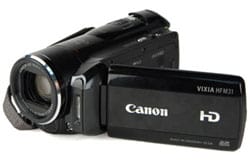
HF M31 Product Overview
The new HFM line of HD camcorders from Canon is easy to use. The small size is great as a secondary camera for a camera bag already loaded with a large dSLR. But don’t let the small size fool you, this HD camcorder is a very capable piece of technology. Canon upgraded last year’s highly regarded HF20 and HF200 models with better image stabilization and a touchscreen LCD to produce the new HFM series. Colour, noise and sharpness performance was very good for a model in this price range. Image quality wise, Canon could have done better with low light performance. Having said that, indoor video quality was not poor but it also was not great; it contained a little more grain than I prefer and the image was not as bright as it could be. Overall, the HF M31 / HFM31 produced very high-quality videos.
HF M31 Compression & Media
The HFM series line of HD camcorders uses AVCHD compression (which is based on the MPEG-4 AVC/H.264 codec) just like most consumer HD camcorders. It has 5 levels of HD quality settings but no standard definition recording just in case anyone absolutely needs this. At up to 24 mbps, we really did see very good quality image on a 50+ inch progressive LCD screen. Keep in mind that the camcorder’s three frame rates (60i, PF24, and PF30) can be used for recording with each quality setting. Do note that the PF24 and PF30 frame rates are not recorded natively. Recordings made using these frame rates are converted by the camcorder and recorded onto memory as 60i. In the real world, we saw good results from PF30 and would not consider using PF24 for any scenes with panning or lots of movement. In fact, just shoot at 60i as it has been around for a long time and very compatible across technologies. And, if needed, deinterlace the final video when you output from your video editing software. Note, to edit AVCHD files, you will need the right software and hardware. Even on a 64-bit quad core computer with lots of RAM, rendering out 1080p videos from AVCHD files required a lot of computing power.
HF M31 Handling and Usability
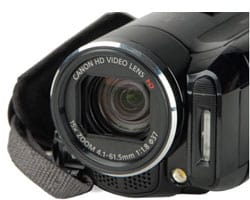
The biggest update from last year’s HF model was a new touchscreen LCD. Most controls are now accessed using the LCD screen. Think of it like an iPhone screen but less sensitive to touch. Images produced here are bright and saturated. The best use of the LCD screen has to be the focusing system. When face detection and tracking are enabled, the camcorder does a very good job at “finding” faces and making sure focus lock is on them. To override, just touch another subject on the LCD screen and the camcorder will lock and track this new subject. A segment of the video above will show you exactly how this works. The LCD focus system is probably the neatest and most useful update in this new HD camcorder.
Things to Improve on the HF M31
As mentioned above, I think low light performance and image stabilization could be better on this unit. But given all the pluses discussed above, I can live with some grain and a slightly darker scene during low light recordings. On the other hand, what I really dislike is Canon’s proprietary hot-shoe size. You have to buy proprietary Canon gear, such as microphones or accessories that attach to a hot-shoe because the shoe provided on this camcorder is slightly smaller than the standard size. You can always purchase a shoe adapter such as the ones found at DM Accessories but that adds costs and you may lose the “hot” side of things if you go this route.
The second thing that Canon should have provided was a mini HDMI to HDMI cable. If you choose to use HDMI to send a signal out to your TV or computer, you will have to purchase this cable as it’s not provided.
Lastly, when the camcorder is powered off, there is no locking mechanism for the image stabilization system. You should never shake sensitive equipment like a camcorder but even more so with this unit. You will hear the rattling of something loose inside. That is actually the image stabilization system! I am surprised that there is no way to park the mechanical parts of this system when the power is turned off on the unit. Once power is turned on, there is no more rattling as the stabilization system is activated and locked down.
Conclusion – Canon Vixia HF M31 / HF M 30 / HF M300
The Canon Vixia HF M31 is easy to use, fun and capable of recording very high-quality video. For a camcorder that records HD video at up to 24 mbps, I can live with, at least for now, a somewhat darker and slightly grainy image during low light shooting. In normal and bright light conditions, video footage is sharp, vibrant and smooth. For those of you considering the purchase of a new HD camcorder, you can check out the video above. All footages were taken on a cloudy day and no post-processing was applied; only transitions and titles were added. Happy shooting!










thanks good post 😀
thank good post and photo machine
I was searching for useful camcorder. Thanks a lot for great review.
very nice
very nice thx …
Excellent review and demo, thx
good post
good post! thanks ..
good post thanks
good machine
Nice camcorder. This is nice but i think i’m better off with my sony bloggiecamcorder. It’s small and it’s more user friendly.
Thanks… good post
Thank’s for sharing..
This is so exciting machine, Thanks for your information.
agree with the fact about stabilization and low light but the advantages of the audio plus the smooth video far dislodge any disadvantages in other areas, especially when compared to its rivals, the The Sony HD CX 350 and the Panny HS 60.Impressing review.thank u.Tan
My sister owns this canon camcorder and I used it on a trip to holland, even though i didnt do the sownloading to my computer it was done for me the results were amazing great camcorder.
Hi! after searching and searching and reading reviews I bought a Canon Vixia HF M 31 and a Azden WLX Pro wireless microphone to have a good quality video trainings.
I started recording and I got a terrible static sound in the recording, even if the mic is off or if I plug somthing else the static is there…the quality of the sound is terrible…I contacted Canon but the only solution the gave me was to send the camera back, and now I’m in Australia recording!!! I’m getting so frustrated..
Any ideas…??? Any suggestions that don’t imply fixing the issue with software?
I’d really appreciate any help
THANKS!
Karen
@Karen, do you get the static when the external mic port is not used, ie. using the on-board mic? If not, then you may have to stick with this.
Other than that, you can try and record the audio with another device and sync it in to the video during post production. This will take a little extra time but should just as well given you are already shooting.
Hope that helps.
CAN SOMEONE PLEASE HELP ME!
I want to buy this camera for making short movies at home for both youtube and acting reels. They will all be staged and well lit (not just point and shoot). But the only editing software I know how to use is Windows Movie Maker that came with my PC.
Can I convert files made with this camera to use in movie maker? I realize I may not reap the true clarity of HD if I go this route, but was told even converted/compressed, I would still get a better picture than standard DVD with a lower model. Also what would be the minimal RAM (or other operation features) I’d need on my system either to A) edit in HD or B) convert to standard and still edit the files.
PLEASE PLEASE PLEASE! I NEED SOME HELP!
PW, with video formats, you may just have to download and try to be sure that everything is indeed compatible. However, I have read other HFM31 owners using the latest Windows Movie Maker Live to edit the raw files from this camcorder.
And yes, you will end up with a much higher quality video using an HD camcorder with conversion than shooting with a standard definition camcorder.
Windows Live Essential has a minimum RAM requirement of 1 Gig but in reality, 2 may work but a minimum of 4 Gigs is a good idea for editing HD video.
Thank you for the excellent video. It worth “a thousand words.”.
Excellent camcorder for the price. It’s very easy to use, although the lack of a viewfinder does make it a bit more difficult if that is what you are used to. And one thing really recommend for this, make sure you buy an extra battery. Like almost all VIXIA camcorders, battery life is short.
I have the same problem as PW; I’m a newbie at this, the Canon HF M300 does not have the internal conversion function (NOT what some reviews have led me to expect), and the MTS2 files can’t be read and won’t be written to DVD-R discs, at least not on my year old HP desktop; I could only copy the file from the SDHD card onto the disc, and of course it won’t play on any of the software I have. I tried converting using the software, but the option won’t work with the file I edited. Had hoped to bring DVD of his great-grandchildren to 89-year old Dad who can’t travel. Getting desperate. Should I just give it back and get an old model that does files that will record to standard DVD-R discs? I like the camera, but the manuals are so confusing and inter-referring that I just can’t find the right step-by-step directions I need. Is there a straightforward software package that is simple enough for someone who is not a techie but can follow actual directions that work, and will convert those files in a Windows Vista OS? Thanks for any suggestions.
P.S. How can I rescue the great video of the kids I’ve already shot from the originals on the camera? On a fast SDHD memory card, but my computer won’t read the file!
@Antonius, have you tried to download the free Windows Movie Maker Live? I have heard of other users being able to use this to edit and create videos from the HFM31, which should be the same as the HFM300.
For paid versions, you can research Adobe Premiere Elements and Sony Vegas to see if it supports this camcorder. Products from Studio or Ulead are also popular video editing software. You should check them out as well.
Good luck.
Many thanks, Ian! I’ll give it a try, and hope it can somehow convert the M2TS files to standard, so I can burn those DVDs! I’ll be sure to get back and let y’all know if it works.
Again, many thanks.
AAARGH!
I tried to download Movie Maker Live onto my year-old computer, but its OS is Vista, and it looks like it won’t download; I downloaded, it did its thing… but in the end, the only Movie Maker I could find (and I used searches as well as checking visually) was the 2006 version that came with the computer. But, reading more posts here and there, it looks like Movie Maker can’t do the conversion necessary after all.
Thanks for the suggestion. However, my plane leaves Monday morning, which doesn’t give me time to learn about all this codec stuff, etc., and I have to have something to take the videos after all that I’ve spent; but I guess I’ll have to go trade in the Canon HF M300 for an older model that takes decent Standard Def that I can copy onto DVD-Rs so we can look at the videos outside the camera. I’m hoping the older models have a microphone outlet and USB port, as I also invested in that, as well as the discs and external memory and ….
Enough. Thanks for your patience and your help. Maybe someday I’ll have the time to learn all this software stuff, or, who knows?, someday Canon and the rest will invest in software that does what needs to be done in a straightforward manner, without needing a (in the end useless) 210 page manual that still doesn’t resolve the basic problem, that M2TS files are for those with lots of money to spend on Blu-Ray players, burners, etc. and who have only friends and relatives with the same level of equipment (and probably income). Maybe in 5 or 10 years, but my Dad may not last that long. Sorry. Just heartbroken.
I have a big problem. I leave on a cruise tomorrow and have a new Vixia HF M300 camera and I want to record a show I will doing on the cruise for a demo. I want the best quality and am not sure which setting to use as I need to make copies of this to send to clients. The highest says for Blue Ray, can I also make standard DVD’s from this settin? I also can’t seem to find out how to stop the on screen display from showing up whan I put the picture on the TV or computer. I don’t want this to show up on the final DVD.
I need HELP and QUICK !!!!
Thank’s..
The good: Very good video at highest quality setting; nice lens performance.
The bad: Poorly designed touch-screen menu system; short battery life; defaults to low-quality video mode.
How charming video! Really great!
thanks…..
Question
I am wanting to burn all my videos/pics onto a DVD but Canon nor any other company is selling the only burner, DW-100 DVD Burner, it seems that goes with our camera in discussion, M31. Everything I read says it is a horrible burner. What are my options, if any? I have been putting everything on my MAC but now my hard drive is full. I want the simplicity of just hooking up my camcorder to the burner and burning to the DVD. Nothing fancy.
PLEASE HELP.. SUGGESTIONS???
@dava, I would recommend you burn your old video files from your MAC on to DVD. This would free up computer space for you to continue downloading new videos from your camcorder.
Hi! after searching and searching and reading reviews I bought a Canon Vixia HF M 31 and a Azden WLX Pro wireless microphone to have a good quality video trainings. :** Thx