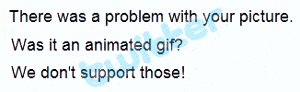
Twitter is a fun and productive tool that allows its users to send and read other users’ updates. This free social networking service has grown so exponentially that, unfortunately, it is often times plagued with bugs and server time outs – frustrating to say the least. The latest bug that is tormenting Twitter users worldwide is the inability to upload a background image. A Twitter background has to be 800 kilobytes in file size and must be in a JPG, GIF or PNG format. But even if you abide by these rules, many users are still getting the dreaded “There was a problem with your picture. Was it an animated gif? We don’t support those!” error. No Twitter, I was trying to upload a JPG that was 700 kilobytes in file size. Seems like Twitter already knows about this bug but there has not been a fix yet… until now that is.
Profile images: can’t add or remove an image, or current image reverts to old image
Error uploading profile picture or background image
Over at Joomlabear.com, there was a solution to remove metadata from the JPG itself and this allowed the image to be uploaded to Twitter. Unfortunately, this did not work for me.
Resolution – Cannot Upload Twitter Background
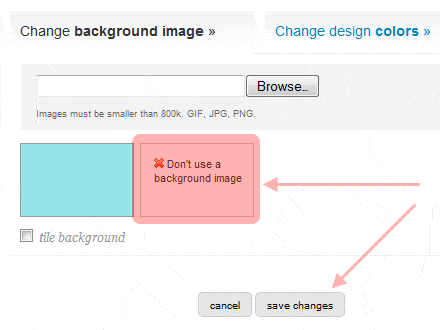
Although not a formal fix, what did work for me was to click on “Don’t use a background image” before clicking “save changes” during the upload process.
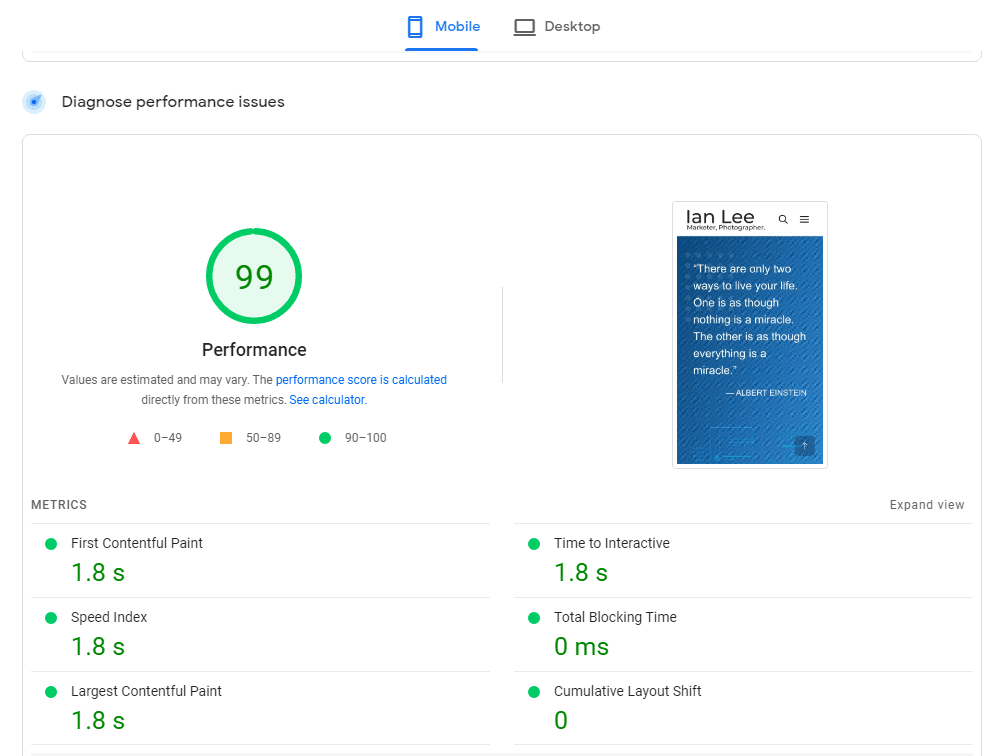
Using this work around, I was finally able to update my Twitter background. How do you like the design?
I hope this can help all of you who are also having difficulty trying to upload a background image to your Twitter account!
Author
Ian Lee
Work from home dad, marketer and photographer. Fallen in love with basketball all over again as I coach my daughter's team.
25 thoughts on “Cannot Upload Twitter Background – RESOLVED”
Hiya Ian,
It’s a shame that my solution did not work for you, were you using CS4? I’ve stripped the meta for about 10 people so far and has worked for all.
Your solution is interesting though – I’ll update my post when I get to the office.
Glad to hear you have helped others to get their Twitter background to update. Unfortunately, I wasn’t able to do so on my end from stripping meta tags.
@chris cooper,
I was out of ideas so just decided to use something simple. You like? 🙂
I use cs2 – no meta tag removal for me, and persistence in uploading paid off. It appeared it wouldn’t accept a re-upload of the same filename, so I suspected cacheing issues. But it worked eventually. Server overload sounds about right.
@Peterfrancon, glad you were able to get your twitter background updated through multiple attempts. I was not able to do so until I clicked on don’t use a background image before doing the upload. Yes, I also noticed that uploading an image with the same file name as one that has already been uploaded often fails. I normally rename to another file name before uploading. Thanks for the note.
I’ve also had that problem, fixed it the same way, but what’s more annoying is that it regularly throws 505 server errors at me – do you get that as well?
As a matter of fact i was so much annoyed with not being able to change my background which was pretty dull. Now your tips i have successfully changed my background. Thanks for your post.
First I had the problem of twitter not accepting any tweets and I couldnt follow people etc etc, now after my upgrade to safari, I can do that, but now I have this background and profile image proble, (it was there before as well 🙁 )
Thanks for the tips…
Just another one that helped me. I was trying repeatedly in Firefox to change my background and nothing worked, however combining the ‘no background’, renaming the file and switching to Internet Explorer finally did the trick for me.
Hey guys i need help. I used twitterbackgrounds.com to see if the site had cool backgrounds so i tried to upload it and it didn’t really work that day. The next day i come online, the background that i chose didn’t really work. Like only the side bare changed colours.SO I’m trying to change the background and it isn’t working at all. It will say “your customization been saved” the background I chose will be there but when i click profile it hasn’t changed…HELP.
I can’t install background from twitterbackgrounds.com to my twitter profile, they always show me an error message instead. What can I do to solve this error?
Hi, Here is the issue: Profile images: can’t add or remove an image, or current image reverts to old image. Clicked the link here and Twitter support says “Sorry, that page doesn’t exist!” I tried whole night to fix my twitter page. Removed metadata from the JPG, clicked on “Don’t use a background image” before clicking “save changes” during the upload process, tried several browsers, cleared history each time. I’m tired now. Any suggestion please?
Trying to upload one of my images for background. My only possible selection in the place where “Choose File” usually sits is the box “Change background.” When I click on this, a drop-down menu appears & the only 2 options are “Remove (the current image) or Choose Existing Image (from one of their images shown above)” .













Hiya Ian,
It’s a shame that my solution did not work for you, were you using CS4? I’ve stripped the meta for about 10 people so far and has worked for all.
Your solution is interesting though – I’ll update my post when I get to the office.
Looks good Ian! all about that branding, eh??
@Big Bear,
Glad to hear you have helped others to get their Twitter background to update. Unfortunately, I wasn’t able to do so on my end from stripping meta tags.
@chris cooper,
I was out of ideas so just decided to use something simple. You like? 🙂
Thanks for that.
Hi Ian
About your Twitter background…
I use cs2 – no meta tag removal for me, and persistence in uploading paid off. It appeared it wouldn’t accept a re-upload of the same filename, so I suspected cacheing issues. But it worked eventually. Server overload sounds about right.
Peter
@Peterfrancon, glad you were able to get your twitter background updated through multiple attempts. I was not able to do so until I clicked on don’t use a background image before doing the upload. Yes, I also noticed that uploading an image with the same file name as one that has already been uploaded often fails. I normally rename to another file name before uploading. Thanks for the note.
I’ve also had that problem, fixed it the same way, but what’s more annoying is that it regularly throws 505 server errors at me – do you get that as well?
You got a very informative blog that helps a marketing guy like me!
Thank you!
Thank you very much for that.
Thank you very for everything.
I keep getting the 505 errors too … finally I just went back to my old background … any fix for that?
As a matter of fact i was so much annoyed with not being able to change my background which was pretty dull. Now your tips i have successfully changed my background. Thanks for your post.
thanks so much admin this is a good site
First I had the problem of twitter not accepting any tweets and I couldnt follow people etc etc, now after my upgrade to safari, I can do that, but now I have this background and profile image proble, (it was there before as well 🙁 )
Thank you. This is very useful for me.
Great article, the twitter background looks great. Thanks for sharing!
omg thanks a lot! now I can change my background 😀
Thanks for the tips…
Just another one that helped me. I was trying repeatedly in Firefox to change my background and nothing worked, however combining the ‘no background’, renaming the file and switching to Internet Explorer finally did the trick for me.
Hey guys i need help. I used twitterbackgrounds.com to see if the site had cool backgrounds so i tried to upload it and it didn’t really work that day. The next day i come online, the background that i chose didn’t really work. Like only the side bare changed colours.SO I’m trying to change the background and it isn’t working at all. It will say “your customization been saved” the background I chose will be there but when i click profile it hasn’t changed…HELP.
I can’t install background from twitterbackgrounds.com to my twitter profile, they always show me an error message instead. What can I do to solve this error?
Hi, Here is the issue: Profile images: can’t add or remove an image, or current image reverts to old image. Clicked the link here and Twitter support says “Sorry, that page doesn’t exist!” I tried whole night to fix my twitter page. Removed metadata from the JPG, clicked on “Don’t use a background image” before clicking “save changes” during the upload process, tried several browsers, cleared history each time. I’m tired now. Any suggestion please?
it’s great this is very nise thank you
Trying to upload one of my images for background. My only possible selection in the place where “Choose File” usually sits is the box “Change background.” When I click on this, a drop-down menu appears & the only 2 options are “Remove (the current image) or Choose Existing Image (from one of their images shown above)” .
thanks a lot! now I wanna change my background
omg thanks a lot! now I can change my background