
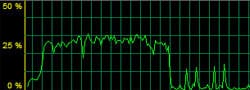
After systematically shutting down services inside Windows Vista SP1, here is a fix that resolved the issue of a slow down in network performance as you transfer large files. My internet security suite is was Shaw Secure and it turned out that 1 particular setting was causing network performance to drop during large LAN transfers. In order to achieve maximum network performance and sustain high transfer speeds, Shaw Secure’s real-time antivirus protection had to be disabled. Here is a network bandwidth graph of transferring a large file over the LAN with real-time scanning enabled. See the drop in transfer speed after a while and it just never recovered.
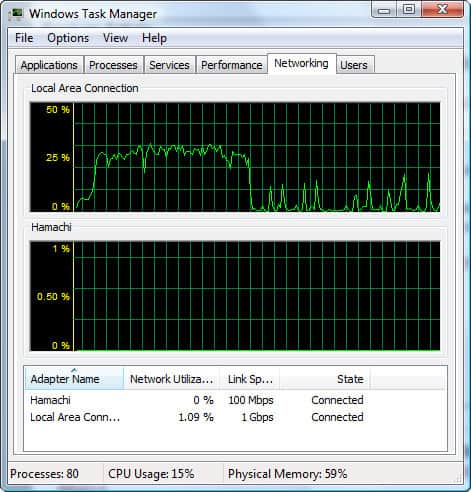
If you run Shaw Secure or another security software and your Windows Vista network speed slows down over time, try disabling your real-time anti-virus scanner to see if it fixes the problem. Of course, if you do decide to disable real-time protection, be sure to schedule frequent scans of your computer to keep yourself protected.













thank for sharing…
I’ ve tried it but it doesn’t work. 🙁
One to remember, thank you
One solution: Get a Mac!
Once you go Mac, you wont go back…
I started with a 2GB file. Transfer speed started out at 4.45 MB/s and then slowly dropped after about .5 GB transferred…it would drop down to about 2.5 MB/s with 1GB left to go and then the entire network connection would crash. I turned off Windows Defender real-time protection and it immediately began going back up to the 4.5 MB/s speed.
Thanks!