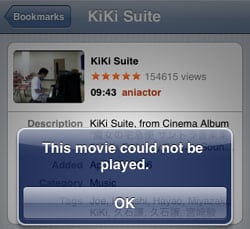
As of yesterday, no YouTube videos could be played on my iPhone through the built-in YouTube App. As we recently modified settings on the router in our office, we thought it was something on our end. Sure enough, no router adjustment could resolve the issue. We continuously get the “This video could not be played” error message. Others on MacRumors are also reporting the latest YouTube outage on the iPhone. Essentially, no YouTube videos are able to be played through the YouTube App on the iPhone. I am sure Apple and YouTube are aware of this glitch and a fix is just around the corner. In the meantime, there is a temporary solution. Just use the Safari browser (on your iPhone) to view YouTube videos instead. This should allow you to continue enjoying YouTube videos on your iPhone.
Author
Ian Lee
Work from home dad, marketer and photographer. Fallen in love with basketball all over again as I coach my daughter's team.
7 thoughts on “YouTube App Does Not Work on iPhone – RESOVLED”
Here’s a temporary work around until someone actually fixes the app.
Go to youtube.com in Safari and bookmark it to the home page of your iPhone. Use this link instead of the youtube app and you’ll get right in- and it works.






Here’s a temporary work around until someone actually fixes the app.
Go to youtube.com in Safari and bookmark it to the home page of your iPhone. Use this link instead of the youtube app and you’ll get right in- and it works.
@RF: Yes, as I mentioned using Safari is a temporary fix. Good tip on creating a home page link to YouTube for easier access.
i was also facing the same problem with my new iphone
thanks for the info will try it now
Thanks for information the same problem is in my blackberry phone
When I try watching movie trough safari it always switch to youtube app.
Mine switch to youtube app as well!
youtube dose not work on my ipohone 2g. every time i try to connect i get the message ‘can not connect to youtube’.