
There have been quick a few issues for users trying to upload photos in Facebook using Windows Vista and Firefox. Page load simply comes to a halt and Firefox crashes when adding photos and creating new albums. Until Firefox and/or Vista and/or Facebook has a true solution, here is a quick fix that works just as well.
1. Install IE Tab add-on for Firefox
Install the IE Tab add-on for Firefox – this add-on will allow you to open a Firefox tab that emulates Internet Explorer (IE). Web designers and developers use this powerful tool to see how web pages are displayed in IE while using Firefox.
2. Right Click and Open Link in IE Tab
After installing the add-on, Firefox will ask to be restarted. After that, you will be able to use Vista and Firefox to upload more photos to Facebook. Simply right click on ‘Add More Photos’ and you will see a tab menu pop up like so:
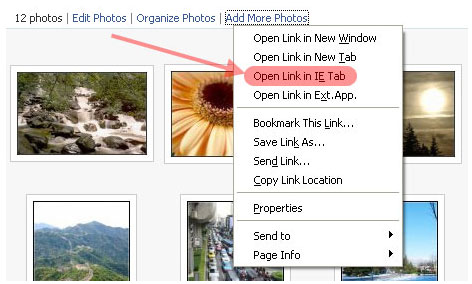
Click on ‘Open Link in IE Tab’. This will open a new Firefox tab that emulates IE. The Facebook album application will load so you can now create and upload new photos to your Facebook account. Note: You will be asked to log in to Facebook again in the new IE tab but it’s definitely easier than having to open the real IE. Double Note: The Firefox IE Tab add-on will also resolve crashes that occur during new photo album creations in Facebook.
That’s it. No more crashing when uploading photos or creating new albums in Facebook when using Windows Vista and Firefox.
Since many web applications are developed with Microsoft’s default web browser in mind, being able to bring back IE functionality of some web pages inside Firefox can be a huge time saver. The above Facebook issue is just one great example. Even if you do not have Facebook crashing issues when using Firefox, the IE Tab Add-on is still a tool worth installing.












I also use the IE tab add-on with Firefox, but only when I am forced to move from my Mac to PC.
I can’t stand when web developers build sites that only work with IE! It is very frustrating.
Thanks, I didn’t know it was happening for other people 🙂
I tried this but it didn’t work for me. The new page opens up in a new tab with the IE rendering engine, but Facebook never lets me login. :/ It redirects me to some error page.
If I open the page up and upload directly in IE it works, though. Sucks. 🙁
I was having this problem with Facebook on Firefox with Vista Home Premium. Today I had exactly the same crash on another site (it was a WebCT interface for my university) which also uses Java. I googled it and found this fix: http://mozillalinks.org/wp/2007/10/firefox-java-plugin-may-not-work-on-vista/
which I prefer because you only need to do it once. In summary, the problem occurs because Vista requires admin privileges to install Java, which if run normally, FF won’t have.
After reading this, I went and tried to add pictures onto Facebook using Explorer instead of Firefox and it worked right away. So if you have both just use Explorer to add the pictures…
Any idea on how to solve this problem on a Mac OSX, as I can’t seem to load pictures with Safari or Firefox….
thanks so much! i just got a new laptop and was so excited to finally get back to uploading pictures, and it just kept freezing. i really thought it was a problem with my computer. so glad to know its not! this worked right away!
i can’t send emails (but can look at sent ones), can’t look up friends list, delete anything or send anything – help !!
i’ve always been a fan of the IEtab plug in. some of the sites only work it IE. so its a must that you upload this in your toolbar guys.
good thing there’s an IE tab.
This is also easily fixed by temporarily turning off the UAC in Vista, re-installing Java and opening a Java enabled page (like the Verify page on Java.com). That will allow Java to do it’s first-run initialization correctly and fix the problem.
Thanks for this information – unfirtunately the current dowload does not work iwth version 3.0b3
Thanks SO much for this information.
I was having the worst time and was convinced it was just me… Only I’m not even using Vista – I am using an XP ‘downgrade’ that I installed through Vista though.
All good now, thanks again!
You can also install the JAVA Software manually. This completely takes care of it!
http://www.java.com/en/download/
This solved the problem of my Mozilla freezing and I am able to get to the upload photo screen. But for some reason, on this screen, the upload photo button just doesn’t work. I’ve selected the photo’s I wish to download (small pics) and clicked the terms box, but when the button is pressed – nothing happens?? Can someone help?
I’m using XP and have tried using the IE Tab and have tried going through both IE and Firefox to upload photos and I still can’t. I get as far as the message saying “data sent” and then the page freezes. Any other suggestions?
just go to http://www.java.com and install java once again… it will work just perfectly 😉
it’s actually a firefox/vista issue
I cant go onto myspace or facebook with windows vista/ firefox. It simply displays ‘Error 404’
or bad connection or something. Im on Wireless broadband, if i use my computer with the XP
i have no problems. It just seems to be one problem after another with Windows VISTA. Old school seems to be the way to go!!
The new Firefox version is nearly flawless and takes care of this problem. It’s not perfect, but it does what it’s suppose to do very well. But i still would rather IE instead.
thanx a million ive been trouble shooting for a few hours getten baked and finally stumbeled onto sumthing that really actually works keep up the good work
Awesome, thought it was a Java issue but this fixed it… Cheers!
I have this problem (Firefox freezing on trying to run java upload in Facebook) with Firefox 3.0.6 on WinXP SP3. I can’t believe it still exists in Feb 2009! Do the programmers test anything after people complain? Come on Facebook investigate, the Internet his littered with people suffering the same problem!
Can’t wait to try this. I’ve been baffled for weeks. Thought it was my computer.
Ooops. Recent update says doesn’t work for Mac0SX.
Rather snarly as most photographers us Mac OSX.
Fixes available for OSX Version 3.9??
Can’t upgrade to later OSX due to peripherals/scanners/printers needed for photography are incompatible with later versions.
Seems like a major problem for Facebook.
Facebook is really sucking, with this picture upload failure. I try to put a small picture and get a message “upload failed, please try later” This is really tiresome, it’s gone on for a couple weeks now. I’m about ready to dump Facebook and go to MySpace.
Facebook – are you listening to your users, or do you even care? I doubt it.
U will have a hard upload pictures? if u notice there is a AD for ie on the bottom of this page forget myspace and facebook im sticking with a mac alot beter than microsoft
I just tried uploading 184 pics to Facebook. It says I can do 200 per album. All was going well until the very last leg of the “data sent”. It told me that the upload failed and to try again later. Well, after doing this 2 times, I am tired. To have to go through this twice and it goes along great and then wham! I’m glad I found some answers in here. Tomorrow I will try IE and see if my pics will upload then. Thanks!
FINALLY! Something that actually works! Thanks for this quick fix, I followed it exactlly as it says and everything turned out fine.
This worked for me too. Thanks so much.
Well, it only worked once. Then it failed every time after that. 🙁
I am unable to post pictures to my friends wall.They post to mine but not my friends.
It is different for me, my computer doesn’t crash or anything, it’s just I upload it and doesn’t go into my folder, it says “photos uploaded click here to view them” so I click there and there aren’t any there.
I’m having the same problem, my photos do not upload. I contacted Facebook & they say to get the updated Java version. Still w the same problem!!!!
I cannot upload photos too! What’s up with Facebook?!
Uploading worked fine for me., until recently when i tried to upload some photos and crashed before i even started. So i looked for SOLUTIONS.
>>Uninstalling my Java even though it was a recent one.
>>Restarted.
>>ReInstalling Java from the site.
>>Everything worked fine again.
Hope this helps.
The IE view for FireFox does not work as a resolution to fix the upload pic problem to Facebook. I have tried this does not work, I also have the latest version of Java.
can’t upload so many pictures at the same time..its still on simple uploading..pls help me with this.other accounts were checked using my computer but it worked on their account..is there any prblem on my account?
@ Kathleen Menke. “Most photographers use Mac OSX”? Sorry, but Posers + 12 year olds (99% Apple users) don’t count LOL. How many PROFESSIONAL photographers do you know?
On topic however, I use Vista 64 with Firefox, IE and Chrome (all latest versions) and NONE of them can upload photos to facebook dicography (even installed latest JAVA)
Facebook = lame
I’ve come to facebook for the first time in a while, and the button to select photos is greyed out on my Mac in both Safari and Firefox. So I’m stumped at step one. Anyone else having this problem?
Hello, Im trying to add a photo album to a facebook busisness page but the it just indicates that its loaded and doesnt move to the next page. Ive tried installing the ie tab but its not compatible with the latest version of firefox….
anyone any ideas around this??
thanks.
I was having the same problem. I have no problems uploading with chrome. =|
Guys, I’ve been able to find the solution for my uploading problem. Here is the article that will help you:
My problem was that I had to install the most modern Adobe Flash player. Silly, ha? Well, it was painful, too…
switch to pc?
I found the SIMPLE SOLUTION to Internet Explorer crashes when trying to upload photos to face book or create a new album in face book. The problem IS FLASHPLAYER!! Simply right click on the Internet Explorer icon on your desktop–scroll down to “Internet Options” Go to “Programs” then “Manage add ons” and find and DISABLE SHOCKWAVE FLASH OBJECT! You can then easily upload your photos to facebook without crashing Face Book and Internet Explorer. Works like a charm!!